
Every ticket on the right screen, the second it's ordered.
Replace the printer roll with a live board your kitchen can actually keep up with: stations, timers, allergens and a one-tap bump.
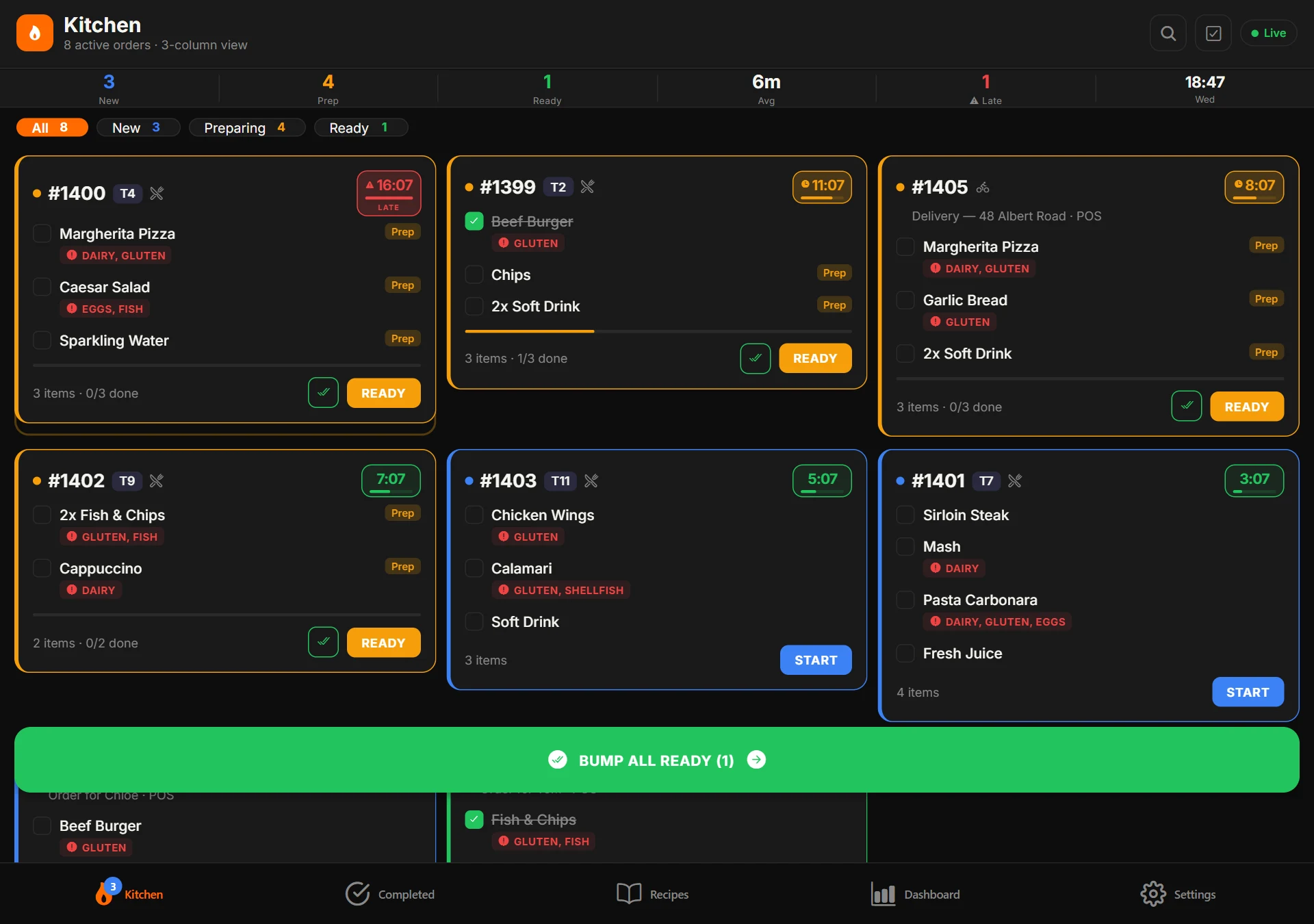
Orders appear the instant they're rung in
As soon as a till confirms an order it lands on the kitchen board, split by station, with table or order type and a running timer.
- Instant sync from every till
- Table, takeaway and delivery tickets clearly marked
- Colour-coded timers show what's running late
- Works over your shop network if the internet drops
Allergens and modifiers on every ticket
Allergens set on products show as flags beside each item, and modifiers and notes are printed in full, so nothing is lost between the till and the pass.
- Allergen flags such as gluten, dairy, eggs, fish and shellfish
- Modifiers and special instructions on the ticket
- Item-by-item progress, 0/3 done
- Hold and fire courses for the right timing
Less shouting, fewer mistakes
A clear queue beats a wall of dockets, especially during a rush.
Station routing
Send grill items to the grill and drinks to the bar, automatically.
Prep-time tracking
See how long every ticket has waited and how your average prep time trends.
Late-order alerts
Tickets change colour the longer they sit so nothing quietly falls behind.
Bump & recall
Bump items as they're done, mark whole orders ready and recall a bumped ticket.
Recipes at hand
Keep recipes in the app so the kitchen can check a build without leaving the pass.
Kitchen reports
See which dishes are slowest and which stations are under the most pressure.
Keeps running offline
Over your shop network, kitchen screens carry on with no internet.
Print when you need to
Send a ticket to a kitchen printer, even if the till that rang it up is off.
Any Android screen
Runs on a tablet, a terminal or a dedicated kitchen display.
Kitchen Display questions
No. The Kitchen Display app runs on any Android tablet, or you can buy a kitchen display from us, pre-configured.
Yes. Route products to different stations and screens, such as grill, cold and bar.
Yes. Use screens, printers or both. Kitchen printers can be assigned to product categories.
The Kitchen Display app is included on every plan, including Free.
The rest of the POSHUT suite
POSHUT POS
The till: counter, table and queue service on Android and in any browser.
ExploreCustomer Display
A customer-facing screen for the order, total, adverts and receipts.
ExploreDriver & Delivery Hub
Your own drivers, a live dispatch map and proof of delivery.
Explore